Data Privacy Training: Protecting Company Information – The Ultimate Guide
Imagine your company is a bustling medieval castle. You have massive stone walls which is your firewall, a deep moat representing your network security, and alert guards who are your IT department. These are all critical defenses. But what happens if a friendly, well meaning kitchen worker leaves the back gate unlatched for a delivery and forgets to lock it? The best moat in the world cannot stop an intruder who just walks through the open door. In the modern digital landscape, your employees are that kitchen worker, the guards, the artisans, and the nobility. Every single person holds a set of keys to the castle. If they are not trained on how to manage those keys, your defenses are incredibly vulnerable. Company information is the crown jewel, and data privacy training is how you teach every person in your kingdom to be a sentry.
Data Privacy Training: Protecting Company Information – The Ultimate Guide
Imagine your company is a bustling medieval castle. You have massive stone walls which is your firewall, a deep moat representing your network security, and alert guards who are your IT department. These are all critical defenses. But what happens if a friendly, well meaning kitchen worker leaves the back gate unlatched for a delivery and forgets to lock it? The best moat in the world cannot stop an intruder who just walks through the open door.
In the modern digital landscape, your employees are that kitchen worker, the guards, the artisans, and the nobility. Every single person holds a set of keys to the castle. If they are not trained on how to manage those keys, your defenses are incredibly vulnerable. Company information is the crown jewel, and data privacy training is how you teach every person in your kingdom to be a sentry.
The Secret Life of Data
We live in an age where data is more valuable than gold or oil. It is the fuel powering business intelligence, marketing, product development, and customer relationships. But data is not just numbers on a spreadsheet; it is a living, breathing asset that requires careful handling.
When we talk about "company information," we are referring to a massive spectrum. This includes proprietary software code, top secret product roadmaps, sensitive financial forecasts, and the private details of your customers and employees. This last category, Personal Data, is particularly sensitive. Names, home addresses, social security numbers, medical history, and credit card details are all part of this. For a cybercriminal, this data is a commodity that can be sold on the dark web or used for identity theft and fraud.
For your company, protecting this data is not just about avoiding a fine. It is about maintaining trust. If customers do not trust you with their information, they will find someone else who will. If employees do not feel their private details are safe, morale and loyalty plummet. Effective data privacy training helps every employee understand their role as a guardian of this trust.
Why Training Is Not Optional (And Why It Should Be A Little Fun)
Let’s be honest: when most employees hear "compliance training," their eyes glaze over. They imagine hours of dry, legalistic lectures and confusing multiple choice quizzes that feel like a waste of time. But data privacy is not a dry topic; it is an active battleground. Making training engaging is not just a "nice to have," it is essential for information retention.
If your training is boring, people will click through it as fast as they can, retaining nothing. If it is interactive, story driven, and dare we say, a bit fun, they will remember the principles and apply them. You want your team to think of data privacy not as a set of annoying rules but as an empowering skill. They are learning to be digital detectives, capable of spotting a clue and stopping a crime before it happens.
The Real Cost of Neglect
Before we dive into the "how," let’s remind ourselves of the "why." What is at stake?
Financial Ruin: The cost of a data breach is astronomical. You face regulatory fines from GDPR, CCPA, and other alphabet soup agencies. You have legal fees, forensic investigation costs, and the expense of providing credit monitoring to victims. The average cost of a data breach is now measured in millions of dollars.
Reputational Nightmare: A brand’s reputation is its most valuable asset. Once trust is broken, it is incredibly difficult to rebuild. A data breach makes headlines, and customers remember.
Operational Chaos: A significant breach or ransomware attack can bring your entire operation to a screeching halt. System downtime means lost productivity, missed deadlines, and a massive headache for everyone.
Effective training acts as a vaccine. It is a small investment of time that builds up the company's immune system, protecting it from a catastrophic illness.
The Rogues’ Gallery: Common Threats Your Employees Must Recognize
To be effective sentries, your employees need to know what the enemy looks like. Cyberthreats are often deceptive and rely on psychological tricks rather than technological brute force. This is "social engineering," and it is terrifyingly effective.
1. Phishing: The Classic Con
This is the grandparent of all digital scams, but it still works because it is constantly evolving. A phishing email is designed to look like it is from a trustworthy source, like a bank, a popular service like Netflix, or even your own company's CEO or HR department.
The email creates a sense of urgency or fear: "Your account has been compromised, click here immediately!" or "Your invoice is past due, view the attachment." The "clue" is often something subtle, a misspelled word, a strange email address, or a link that does not match the text. Training should show real world examples of these emails, giving employees a checklist of things to look for.
2. Tailgating: The Physical Breach
Not all data theft happens digitally. Tailgating is when an unauthorized person follows an authorized employee through a secured door. They might be dressed as a delivery person, a technician, or just act like they belong.
Training needs to empower employees to say, "I am sorry, but I can't let you in without your badge," even if it feels rude. A secure physical environment is the first layer of data defense.
3. The Weakest Link: Your Password
"Password123" is not a security measure; it is a welcome mat for hackers. Training must cover the basics of password hygiene:
Complexity: At least 12 characters, mixing uppercase, lowercase, numbers, and symbols.
Uniqueness: Never reuse the same password for multiple accounts. If one service is breached, all your other accounts are at risk.
Use a Password Manager: This is the ultimate "power up" for employees. Password managers generate and store strong, unique passwords, making their digital life both easier and more secure.
4. Malicious Software (Malware): The Silent Saboteur
Malware can be downloaded by clicking a suspicious link, opening an infected attachment, or even just visiting a compromised website. Ransomware is a particularly nasty type that encrypts your company’s data and demands a ransom to unlock it. The training should emphasize one clear rule: "When in doubt, don't click." Employees need a clear, easy way to report suspicious content to the IT team.
5. The Insider Threat: Not Always Malicious
Sometimes the threat comes from inside the house. An insider threat isn't always a disgruntled employee selling secrets. It is often a well meaning person who makes a mistake. This could be sending an email with sensitive data to the wrong person, misconfiguring a cloud storage bucket so it is public, or losing a company laptop that is not encrypted. Training should not just be about "bad guys," but about personal responsibility and careful work habits.
Building Your Defense: What Comprehensive Data Privacy Training Looks Like
You cannot just give your team one lecture and call it a day. A successful data privacy training program is an ongoing initiative. Think of it less like a single course and more like a fitness plan for your company’s security posture.
Make it Relevant to Their Job
The data privacy concerns of a software developer are different from those of an HR manager or a salesperson. The developer needs to know about secure coding practices and protecting API keys. The HR manager needs to know how to handle sensitive employee records. The salesperson needs to know how to protect customer contact data. General training is good for the basics, but job specific training is what makes it stick.
Gamify the Experience
Turn learning into a friendly competition. Create quizzes with leaderboards. Run simulated phishing campaigns and reward the departments with the fewest clicks. (This is a fantastic way to train people. If they click the "fake" phishing link, instead of a virus, they get a friendly screen that says, "This was a test. Here are the red flags you missed.")
Focus on Real World Scenarios
Use storytelling. Instead of saying "do not share passwords," tell a story of how a major breach happened because one person shared a password with a "technician" who was actually an attacker. Real world examples are memorable and create an emotional connection to the subject.
Keep it Short and Regular
People have short attention spans. Instead of an hour long training video, offer five minute "microlearning" modules. A quick tip in the company newsletter or a short video about a new scam can keep data privacy at the front of mind without being overwhelming.
Key Topics Every Program Must Cover
Your training curriculum should be structured and comprehensive. Make sure you are hitting these essential points:
Understanding "Personal Data": Define what PII (Personally Identifiable Information) and PHI (Protected Health Information) are. Give employees a clear understanding of the data that requires the highest level of protection.
The Lifespan of Data: Train employees on how to create, use, store, share, and ultimately destroy data securely. For example, sensitive paper documents should be shredded, not just thrown in the recycling bin.
Secure Communication Channels: Advise your team on which tools are safe for sharing sensitive data. A chat app might be fine for a casual conversation, but not for sharing a password or customer financial details. Use company approved, encrypted file sharing services.
Reporting Incidents: This is arguably the most important section. Every employee must know exactly who to contact if they suspect a data breach, have clicked a suspicious link, or have lost a device. They should feel safe reporting an error without fear of punishment. A quick report can make the difference between a minor incident and a full scale catastrophe.
Remote Work Security: In our post 2020 world, the office perimeter has dissolved. Employees working from home, coffee shops, or airports need a specific set of rules. This includes using a corporate VPN (Virtual Private Network), locking their screen when they step away, and securing their home Wi Fi network with a strong password.
Measuring Success: How Do You Know If It’s Working?
You are investing time and resources into this training, so you need to know it is effective. You can’t just measure completion rates; you need to measure behavior change.
Phishing Simulation Metrics: Are the click rates going down over time? Are employees correctly reporting the simulated phishing emails to IT? This is a great indicator of improved vigilance.
Incident Reports: An increase in the number of "near miss" reports from employees can actually be a good sign. It shows they are more aware of potential threats and know how to report them.
Compliance Audits: Run regular internal audits to see if data is being stored and handled correctly according to policy.
Employee Feedback: Ask your team what they think of the training. Is it helpful? Is it boring? Their feedback will help you refine the program and make it more effective.
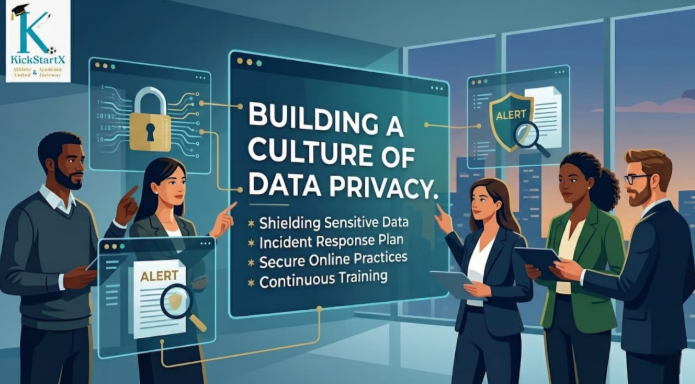
Conclusion: Creating a Culture of Privacy
Data privacy training is not just a checkbox to satisfy your legal department. It is an investment in your company's future. It is about building a workforce of confident, capable digital guardians. When every person in your "castle," from the newly hired apprentice to the monarch in the CEO office, understands their role in data protection, you don’t just have a security policy; you have a security culture. This proactive, prepared, and persistent approach is the ultimate defense for your most valuable assets. Your information is secure, your customers are safe, and your kingdom is protected.
Need help making the right career decision?
Explore KickStartX career counselling and education guidance services for personalised support, scientific assessments, and structured career planning.
Explore related KickStartX services
Continue from this topic to the most relevant counseling, admission, abroad studies, skills, and career pathway pages.